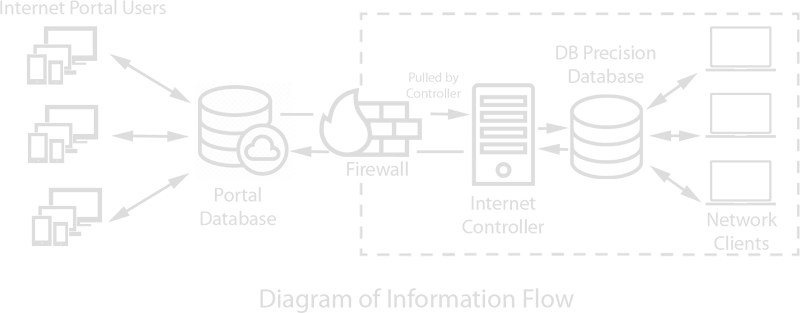
Read this section before beginning installation to learn how the servers and computers work together and what information PensionSoft needs to prepare your database files. If you have already reviewed these items, skip to the DB Precision installation steps.
Overall installation components
- Database setup: Your network must include a Database Server with Microsoft SQL Server installed. This server houses the DB Precision databases. After your organization has signed the Software License Agreement (SLA), PensionSoft will provide three database backup files that are restored to the Database Server to supply the complete database design.
- Information needed before the database files are sent: Before PensionSoft prepares the files, provide the installed SQL Server version and the full Database Server name, including the instance name.
- DB Precision setup: DB Precision can be installed on the Database Server, but we recommend installing each copy on a separate machine used as a Network Client.
Network configuration overview
DB Precision uses a client-server network configuration with the following components:
- Database Server: This machine houses the DB Precision databases. It may be a dedicated physical machine or a virtual desktop.
- Network Clients: These are the machines users access to run DB Precision. Each Network Client may be a physical machine or a virtual desktop.
- Internet Controllers: These are required only for organizations using the Secure Pension Portal. They are configured similarly to Network Clients and have the same requirements, but they process Portal activity and must remain running at all times.
Performance recommendation: For optimal performance, keep the Database Server and Network Clients on the same network. If the Database Server is remote, install the Network Clients on that remote network and have users connect to those clients remotely.
Already have DB Precision installed? To add another Network Client, go directly to Step 4: Network Client Installation.
- Review requirements by network component.Confirm the database server, Network Clients, and Portal Controllers meet the applicable software and hardware requirements.
- Install and configure SQL Server.Prepare SQL Server or SQL Server Express before the DB Precision databases are installed.
- Install the Database Server.Create and restore the DB Precision databases, then configure the database login.
- Install each Network Client.Install DB Precision on the computers that will connect to the Database Server.
Complete these steps if your organization uses the Secure Pension Portal.
- Install the Portal.Prepare the Portal server and configure the Portal website components.
- Install the Portal Controller.Configure the DB Precision login that processes requests from Portal users.
- Choose an automated startup method.Compare AlwaysUp, Task Scheduler with a batch file, and Task Scheduler with a batch file and PowerShell.